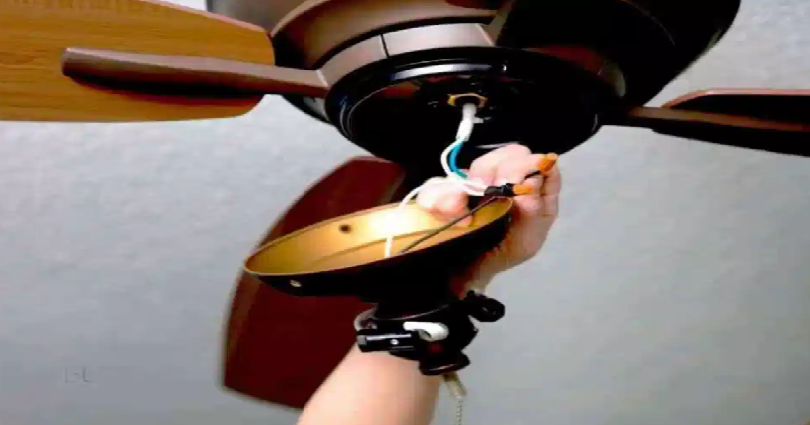
A ceiling fan should be a source of quiet comfort, especially when running on its lowest setting during a peaceful night. However, when you hear a persistent clicking, humming, or ticking sound, it can quickly become an irritant. A ceiling fan making noise at low speed is rarely a sign of total motor failure; instead, it is often an early-stage warning that something mechanical or electrical is slightly out of alignment.
Addressing these minor noises throughout the year can prevent them from developing into more serious issues, such as those described in our guide on ceiling fan grinding noise. Identifying the sound at low speeds is actually an advantage, as it allows you to troubleshoot the fixture before the high-speed “whoosh” of air masks the problem or causes permanent damage to the motor.
Contents
Quick Answer: Why Your Fan Is Noisy at Low Speed
If you are looking for a fast diagnosis, most low-speed ceiling fan noises are caused by:
- Loose Hardware: Screws in the blade irons, motor housing, or light kit vibrating against the frame.
- Early Bearing Wear: Lack of lubrication creates a soft rubbing sound that is audible only when the fan is quiet.
- Incompatible Switches: Using a light dimmer instead of a fan-rated speed control creates an electrical hum.
- Capacitor Failure: A weakening capacitor struggles to provide consistent voltage, causing the motor to “groan.”
- Dust Buildup: Uneven weight distribution creates a subtle “thump” or “wobble-click” at low RPMs.
Why Ceiling Fan Noise Is More Noticeable at Low Speed
It may seem counterintuitive that a fan is noisier when it is working less, but there are two primary reasons for this phenomenon.
1. The Masking Effect
At high speeds, a ceiling fan moves a massive volume of air. This creates a consistent level of “white noise” or aerodynamic “whooshing.” This sound frequency often overlaps with and masks mechanical clicks or light humming. At low speeds, the air movement is silent, leaving the stage entirely to mechanical friction or electrical interference.
2. Frequency and Resonance
Every mechanical system has a “resonant frequency.” At low RPMs (Revolutions Per Minute), the vibrations of the motor may match the natural frequency of the fan’s housing or the downrod. This creates an amplification effect. As the speed increases, the frequency shifts, and the vibration may dissipate, even though the underlying problem still exists.
Causes of Ceiling Fan Noise at Low Speed
Because the torque and speed are lower, the motor and blades interact with gravity and electricity differently. Here are the specific causes for noises that appear only at the bottom of the speed dial.
Dry or Partially Lubricated Bearings
In the early stages of bearing wear, you won’t hear the harsh metal-on-metal sound of a complete failure. Instead, you will hear a soft, consistent rubbing or “sandpaper” sound. At low speed, the motor doesn’t have enough momentum to glide over dry spots in the grease, making the friction more audible.
Slight Blade Imbalance
A severe wobble is obvious at high speeds, but a slight imbalance often manifests as a rhythmic “ticking” at low speeds. As the fan rotates slowly, the “heavy” blade pulls on the motor shaft once per revolution. This subtle tugging can cause the internal components to tap against the housing. For help with maintenance, see How to clean ceiling fan blades to ensure dust isn’t the culprit.
Loose Screws and Minor Vibrations
The most common cause of a low-speed “click” is a loose screw. This could be where the blade meets the arm, where the arm meets the motor, or even a screw inside the light kit. At low speeds, the vibration isn’t strong enough to “hold” the screw in place via centrifugal force, allowing it to rattle in its seat.
Dimmer Switch Incompatibility
Many homeowners accidentally use standard wall dimmers for fans. Dimmers work by “chopping” the electrical sine wave to reduce voltage. While a light bulb doesn’t care about this, a fan motor does. At low settings, the “chopped” wave is at its most extreme, causing the motor windings to vibrate and produce a loud, persistent buzz or hum.
Capacitor Weakening
The capacitor is the “battery” that helps the motor start and run at different speeds. If the capacitor is beginning to fail, it may struggle to maintain the phase-shift required for low-speed torque. This results in an electrical groan as the motor works harder to maintain a slow, steady rotation. If the fan eventually stops spinning altogether, consult ceiling fan hums but doesn’t spin.
Loose Internal Wiring
Inside the switch cup or the canopy, there are several wire nuts and bundles. If these are not tucked away tightly, they can lean against the rotating motor or the housing. At low speeds, a loose wire may gently “tap” against the metal every time the fan rotates, creating a light, mysterious ticking sound.
Diagnostic Table: Noise vs. Cause
Use this table to quickly identify the likely source of your low-speed noise based on the sound profile.
| Noise Type | Likely Cause | What to Check | Primary Fix |
| Consistent Buzz/Hum | Dimmer Switch | Wall switch type | Replace with fan control |
| Rhythmic Ticking | Loose Screws | Blade and housing hardware | Tighten all screws |
| Soft Rubbing Sound | Dry Bearings | Oil reservoir or age of fan | Lubricate or replace motor |
| Light Tapping | Loose Wiring | Inside the canopy/switch cup | Secure and tuck wires |
| Intermittent Thump | Blade Imbalance | Dust buildup or blade height | Clean and balance blades |
| Groaning/Droning | Weak Capacitor | Starting speed performance | Replace capacitor |
Step-by-Step Troubleshooting Guide
Follow these steps in order to isolate and eliminate the noise in your home.
Step 1: The High-Speed Comparison
Turn your fan to the highest setting.
- If the noise disappears: It is likely a resonance or resonance-based vibration.
- If the noise gets louder: It is likely a mechanical issue like bearings or a severe imbalance.
- If the noise stays the same volume: It is almost certainly electrical (the switch or capacitor).
Step 2: Perform a “Wobble Check”
Observe the fan at low speed. Watch the “canopy” (the part against the ceiling). If the canopy is moving even slightly, the fan is unbalanced. This puts stress on the ball joint and downrod, causing a low-speed “creak.”
Step 3: Inspect the Hardware
Use a screwdriver to check every visible screw. Do not over-tighten, but ensure they are “snug.” Check:
- Blade-to-iron screws.
- Iron-to-motor screws.
- Light kit attachment screws.
- Glass globe thumb-screws (these are often the source of low-speed rattles).
Step 4: Verify the Switch
Look at the wall control. If it has a slider that doesn’t have “click” stops for Low, Medium, and High, it is likely a light dimmer. Light dimmers are the #1 cause of low-speed electrical buzzing.
Step 5: Check Lubrication

If your fan is a vintage model (like a Hunter Original), check the oil level. If it is a modern, permanently lubricated fan, listen to the motor with a cardboard tube (like an empty paper towel roll). If the grinding is coming from inside the motor shell, the bearings are the issue.
How to Fix Ceiling Fan Noise at Low Speed
Lubrication (For Older Models)
If your fan has an oil hole, add a few drops of non-detergent 10-weight or 15-weight motor oil. Avoid WD-40, as it is a solvent and will actually strip the remaining grease away from the bearings.
Tightening and Dampening
Sometimes, metal-on-metal contact is inevitable. You can use small rubber washers (available at any hardware store now) between the blade arms and the motor. These act as “shock absorbers” that dampen the vibrations that become audible at low speeds.
Replacing the Switch
If you have a buzz, replace your wall switch with a dedicated 3-speed fan control. These use capacitors to limit voltage in a way that keeps the electrical sine wave smooth, eliminating the hum.
Replacing the Capacitor
If the fan hums and struggles to get moving at low speed, the capacitor is the likely culprit. This is a small, inexpensive black box inside the switch housing. Match the $\mu F$ rating exactly when buying a replacement.
When to Worry (Safety Section)
While most low-speed noises are harmless, some indicate a safety risk. You should turn off the fan and call a professional if you notice:
- Excessive Heat: The motor housing feels hot to the touch (above 60°C or 140°F).
- Burning Smell: This indicates that the motor windings are melting or the capacitor is leaking.
- Electrical Arcing: If you hear a “snap” or “pop” accompanied by a flicker in the light kit.
- Sudden Increase in Noise: If a soft hum suddenly turns into a loud grinding, the bearings have likely failed completely.
Prevention Tips
- Monthly Cleaning: Dust is the enemy of balance. Use a microfiber cloth to wipe the top of the blades once a month. For more details, see How to clean ceiling fan blades.
- Annual “Snug-Down”: Once a year, check all mounting hardware. Vibration is a natural byproduct of rotation, and it will eventually loosen screws.
- Avoid Dimmer Switches: Never install a fan on a circuit controlled by a standard light dimmer.
- Proper Installation: Ensure the junction box in the ceiling is “Fan Rated.” A standard light fixture box is not strong enough to support the dynamic weight of a spinning fan, leading to structural noises at low speeds.
Conclusion
A ceiling fan making noise at low speed is a nuisance, but it is also a helpful diagnostic tool. By catching these small “ticking” and “humming” sounds early, you can perform simple maintenance—like tightening a screw or cleaning the blades—that extends the life of your motor by years.
Most low-speed noises are solved with a screwdriver and a little bit of patience. However, if the noise persists or is accompanied by heat, it’s time to consider a more significant repair or a replacement.
FAQ Section
Why is my ceiling fan quiet at high speed but noisy at low?
This is usually due to the “masking effect” of air movement. At high speeds, the wind noise is louder than the mechanical clicks. Additionally, resonance at low speeds can cause the fan housing to vibrate in a way that stops once the speed increases.
Can a ceiling fan be damaged if I ignore the noise?
If the noise is caused by dry bearings or an imbalance, ignoring it will lead to permanent motor damage over time. If the noise is just a loose screw in the light kit, it isn’t dangerous, but it is annoying.
Is low-speed noise normal?
A very faint electrical hum is normal for some AC motors, especially in older fans. However, clicking, ticking, or grinding sounds are never “normal” and indicate a need for maintenance.
Should I lubricate a modern ceiling fan?
Most fans manufactured in the last 20 years have “permanently lubricated” sealed bearings. You cannot and should not attempt to lubricate these. If they are noisy, the motor or the entire fan usually needs to be replaced.
How do I know if my switch is a dimmer or a fan control?
A fan control will usually have 3 or 4 distinct “steps” or clicks. A light dimmer is usually a smooth sliding motion. If your fan hums on a smooth slider, the switch is likely the problem.


